> For the complete documentation index, see [llms.txt](https://manual.formwise.ai/formwise/llms.txt). Markdown versions of documentation pages are available by appending `.md` to page URLs; this page is available as [Markdown](https://manual.formwise.ai/formwise/advanced-features/login-mode-and-monetization/setting-up-subscription-plans/customizing-individual-tool-credit-usage.md).
# Customizing Individual Tool Credit Usage
In SaaS Mode, you can control how many credits your users consume when interacting with your SmartForms and CoPilots.
#### **How Credits Are Collected**
**SmartForms (Charged Per Output Generated)**
* Credits are deducted **only when the final output is generated**.
* **Default: 5 credits per generation** (modifiable based on prompt chains).
* Users **won’t be charged** if:
* The process is interrupted (page reload, connection issue).
* The tool fails before generating an output.
💡 **Tip:** Increase credit cost for **longer, multi-step prompts** or decrease it for **simpler tools**. Read the article below for more information.
{% content-ref url="/pages/EJBujmKI1FsTP1xQyJDW" %}
[Pricing Your Tools Accordingly & Credit System in Login Mode](/formwise/advanced-features/login-mode-and-monetization/setting-up-subscription-plans/pricing-your-tools-accordingly-and-credit-system-in-login-mode.md)
{% endcontent-ref %}
***
**CoPilots (Charged Per Message Generated)**
* **Credits are deducted per message**, ensuring fair usage.
* **Default: 1 credit per AI-generated message** (regardless of length).
* Users are charged **each time a new AI response is created**.
💡 **Tip:** Keep the cost low for **frequent back-and-forth chats**, or increase it for **high-value, expert-level AI responses**.
***
#### **Adjusting Credit Costs for Your Tools**
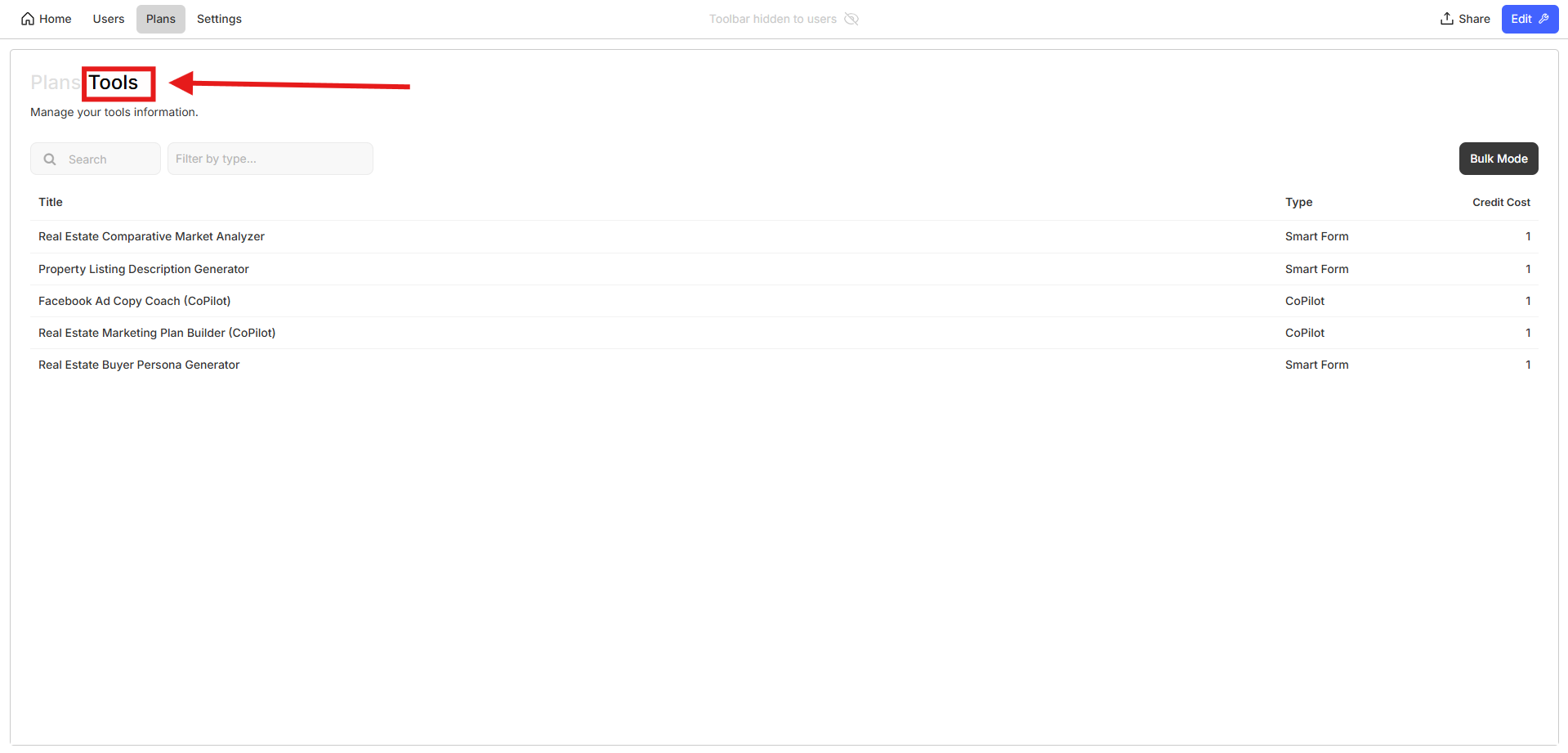
* Go to your **Toolset "Plans" settings and click on "Tools" tab. It should be greyed out.**
Tools tab
Edit the credit cost
* Find the **Credit Cost section** under each tool.
* Modify credit values to **match the complexity and value of your tool**.
* Save changes—users will now see the adjusted pricing when using your AI tools.
By customizing **credit consumption**, you **balance profitability and user experience**, ensuring your AI tools remain valuable and accessible. 🚀
---
# Agent Instructions
This documentation is published with GitBook. GitBook is the documentation platform designed so that both humans and AI agents can read, navigate, and reason over technical content effectively. Learn more at gitbook.com.
## Querying This Documentation
If you need additional information that is not directly available in this page, you can query the documentation dynamically by asking a question.
Perform an HTTP GET request on the current page URL with the `ask` query parameter, and the optional `goal` query parameter:
```
GET https://manual.formwise.ai/formwise/advanced-features/login-mode-and-monetization/setting-up-subscription-plans/customizing-individual-tool-credit-usage.md?ask=&goal=
```
`ask` is the immediate question: it should be specific, self-contained, and written in natural language.
`goal` is optional and describes the broader end goal you are ultimately trying to accomplish on behalf of the user. GitBook uses it to tailor the answer towards what is most useful for that goal.
The response will contain a direct answer to the question and relevant excerpts and sources from the documentation.
Use this mechanism when the answer is not explicitly present in the current page, you need clarification or additional context, or you want to retrieve related documentation sections.